How to Reprint Uniuyo Post UTME Slip
To reprint your slip, follow the instructions below; What you need are (1) You JAMB Registration number and (2)your PIN (If you have not registered yet, Get the Registration Procedure at www.uniuyoinfo.com
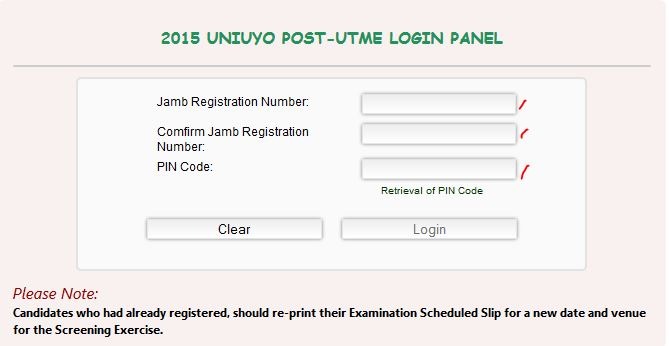
- Visit: http://postutmeportal.uniuyo.edu.ng/
- Insert your JAMB Registration Number in the space provided
- Confirm your JAMB Registration Number
- Type in the PIN code (used during registration) You can find this PIN on tyour old registration slip just below the phone number. You can Also retrieve the PIN if you lost it
- Click Login
After Logging in…
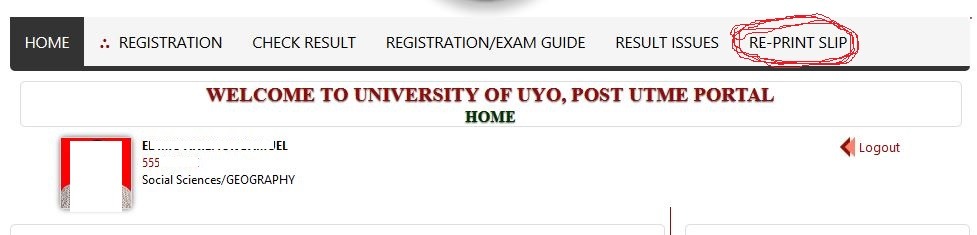
- Head straight to the RE-PRINT SLIP on the menu as shown on red circle above.
- Now, reprint your slip.
- If you are looking for best quality printers, have a peek at this web-site
Please note that you have to no the followinig…
* Bring along four (4) copies of this slip to the Examination Hall printed in colour.
* bring Four (4) copies of 2015 JAMB (UTME) Result Printout with passport on it
* GSM phones or calculator would NOT be allowed.
* Visit: www.cbt.uniuyo.edu.ng for On-line CBT Demo Practice Environment.
* You are expected to come along with FOUR recent passport-size photographs on red background (SAME PHOTOGRAPH AS THE ONE USED FOR THIS REGISTRATION).
* Revisit the University website three (3) days to the examination date for any information.
Last Minute UNIUYO Post UTME Preparation with the original UNIUYO Post UTME Past Question can make a difference. Even one additional mark can be a determining factor in the admission. So, get the UNIUYO Post UTME Past Questions now and start reading.
Success to everyone.
I’m impressed, I have to admit. Seldom do I encounter a blog that’s both equally educative and amusing,
and without a doubt, you’ve hit the nail on the head. The issue iss something
ttoo few folks are speaking intelligently about. I am very happy I
came across this during my search for something concerning
this.