How to Pay Uniuyo School Fee using Remita
Here is a quick tutorial on how to pay the University of Uyo school fee using the Remita platform.
step 1:
Get a pc. Visit the Uniuyo student portal at http://uniuyo.nucdb.edu.ng
step 2
Enter your reg number and password. then click on the login button
step 3
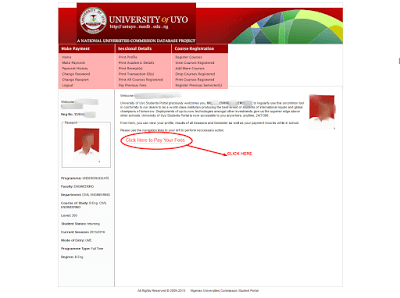
On the page that loads up. Click on the pay fees link as shown on the image above.
If you prompted to update information, just change your level to the correct one and click on update.
step 4

Click on continue…
step 5:
Select the payment type as shown below. And click on “Pay via Remita”.
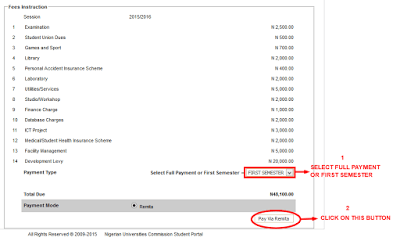
A confirmation page showing the break down of fee comes up. Just scroll down and hit click the confirm button.
step 6:
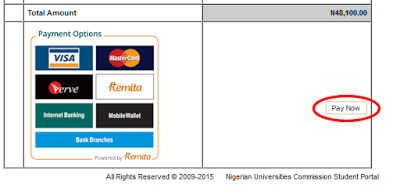
Click the pay now button.
step 7:
On the new page. Copy down the RRR number.
No, seriously. copy down that number!
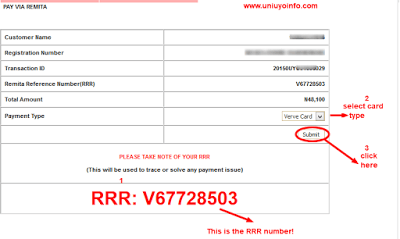
Then select your payment type and click the submit button!
A page containing the above text will show up for a few seconds… Just relax and wait.
step 8:
- The payment plat form loads up. Enter your ATM card number (that 16 digit number in front of the card)
- The CVV number is that 3 digit number at the back of the ATM card
- Enter the name on the card…(exactly as it’s written on the ATM)
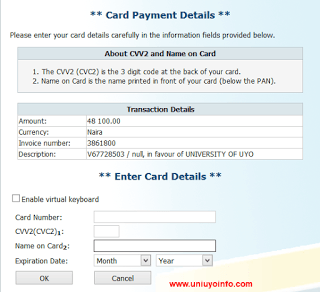
step 9:
Clicking the OK button above will open the page below.
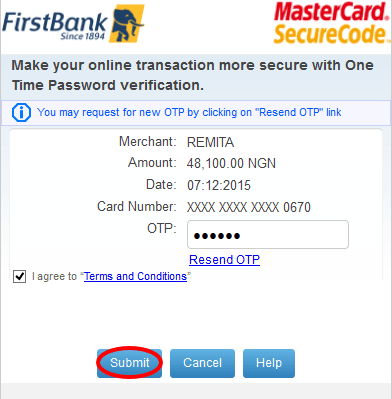
The above is the verifcation page. A 6 digit PIN is sent to the phone number associated with the used ATM. Simply enter the the 6 digit OTP in the space provided as shown above!
step 10:
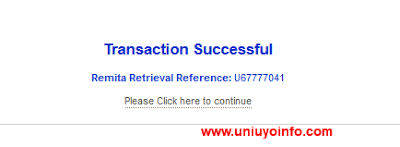
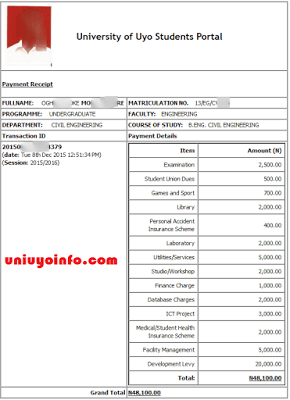
On clicking on the submit button. You should get the “Transaction Successful” Notification.
Click on the black text below it to print out your receipt.
CN I make payment through this process outside uyo?? Am currently in Lagos.
Yes
i cant select the card type as shown in step 7. The only option available is bank branch
How do get the reg number and password in the first place?
To get a registration number, visit your faculty officer for more information.
Please any idea when the school fees portal will be closing?
I need to know please
Thanks
I paid twice pls what can I do?
Click Here to Authenticate your RRR code and everything will be just fine.
If you get the alert but the fees is not reflected in your account, what happens?
If you get the alert but the fees is not reflected in your account, what happens?
I paid twice…wat can i do abt dat
mine is showing me null ohh, and they have deducted money from my account
Hostel space available at Udi street down bunk, contact me…08100284857
the remita platform is not fast unlike branch bank, please let’s work on it
Could be your internet connection. It's doing just fine over here.
This Remita platform aint't working fast unlike BRANCH COLLECT
Thanks veri very much,